
Pkr365 Game Deposit & Withdrawal Complete Guide
Managing deposits and withdrawals is an important part of using any online gaming platform in Pakistan. Pkr365 is described as a new earning game where users can access different games on mobile devices and PCs. Before adding money, users should understand the available payment process, transaction status, and withdrawal conditions. A clear process helps reduce mistakes and makes it easier to identify payment or account problems. Users should also review fees, limits, verification rules, and other terms before making financial transactions.
How to Deposit on a Pkr365 Game Account?
Adding funds usually requires you to access your account first and follow the available payment instructions.
- Login to Your Account: Open the Pkr365 website or app and login with your registered account details.
- Go to Deposit Section: Open your account wallet or deposit area and check the payment options currently available.
- Select Payment Method: Choose a payment method shown by the platform and confirm that the details belong to the correct account.
- Enter Deposit Amount: Enter the amount you want to add and carefully check the value before continuing.
- Confirm Payment: Follow the displayed payment instructions and complete the transaction through the selected payment service.
- Check Wallet Balance: After payment, return to your account and check whether the wallet balance has been updated.
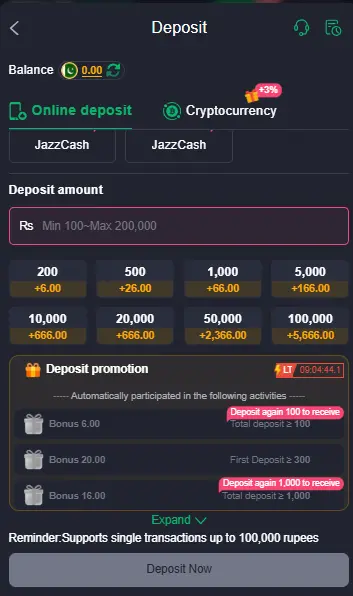
Important Deposit Checks
Do not assume that a successful payment automatically means the money is available for every game or withdrawal. Keep your transaction reference or payment receipt until the balance is confirmed. If the payment method belongs to another person, check the platform’s rules before using it.
For Android users, Google recommends getting apps from Google Play when possible and warns that apps from unknown sources can put devices and personal information at risk. Google Play Protect also scans apps and can warn about or remove harmful software.
How to Withdraw Your Funds from Pkr365 Game Account?
A withdrawal should be treated as a financial transaction, so check the account information carefully before submitting your request.
- Login to Your Account: Sign in to your Pkr365 account and make sure you are using the correct profile.
- Go to Withdraw Section: Open the wallet or withdrawal area to view the options available for your account.
- Select Payment Method: Choose an available withdrawal method and confirm that your payment details are correct.
- Enter Withdrawal Amount: Enter the amount you want to withdraw while checking any displayed minimum or maximum limits.
- Submit Request: Review the request carefully and submit it after confirming the required account or verification information.
- Receive Funds: Wait for the transaction to be processed and check the selected payment account for the funds.
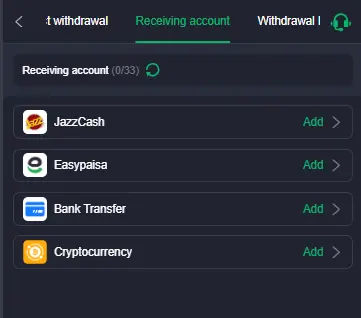
What to Check Before a Withdrawal
Withdrawal conditions can vary between platforms and account types. Check the minimum withdrawal amount, available payment methods, verification requirements, processing information, and any applicable fees before submitting a request.
Do not pay an unknown person simply because they claim an extra fee is required to release your withdrawal. If a payment issue occurs, first check the transaction record and contact the platform through its official support channel.
Deposit and Withdrawal Safety Tips
Financial transactions need more care than ordinary app activity. A real money app or lottery app may involve payments, account balances, or other financial information, so users should understand the risks before depositing.
- Use the official source: Download the application only from a source you can verify. Avoid random APK websites, forwarded files, or links from unknown social media accounts.
- Check payment details: Before sending money, confirm the account number, wallet information, amount, and payment method.
- Keep transaction records: Save screenshots, reference numbers, and payment confirmations until the transaction is fully completed.
- Protect your login details: Never share your password, OTP, PIN, or other private security information with another person.
- Review the rules: Check the platform’s terms for deposit limits, withdrawal requirements, fees, account verification, and restricted activities.
- Start carefully: If you are unfamiliar with an online gaming platform, avoid depositing more money than you can afford to lose.
Google also provides Data Safety information for apps distributed through Google Play, helping users review how an app reports its data collection and sharing practices.
Fix Common Problems During Deposit and Withdrawals
Payment Not Showing in Wallet
Check your payment receipt, transaction reference, and account balance first. If money was deducted but the wallet remains unchanged, contact the official support channel with the transaction details.
App Shows “Transaction Failed”
Check your internet connection and payment details, then try again only after confirming that the first transaction did not go through. Avoid making repeated payments while the original transaction is still unclear.
Withdrawal Pending for Too Long
Review the withdrawal status and any verification requirements shown in your account. Keep the request reference and contact official support if the status remains unchanged.
Withdrawal Request Rejected
Check whether your account details, withdrawal amount, verification information, or selected payment method meet the platform’s requirements. Correct any issue shown before submitting another request.
OTP Issues
Make sure your registered phone number can receive messages and has a stable network connection. Never share an OTP with another person, even if they claim to be platform support.
Deposit vs Withdrawal: What Is the Difference?
| Transaction | Main Purpose | What Users Should Check |
|---|---|---|
| Deposit | Adds funds to the account | Amount, payment method, transaction status |
| Withdrawal | Moves available funds out of the account | Eligibility, payment details, limits |
| Failed Transaction | Payment was not completed successfully | Payment record and balance |
| Pending Transaction | Request is still being processed | Status and verification |
| Rejected Withdrawal | Request was not accepted | Reason for rejection and account details |
What Should You Do If Money Is Deducted but Not Received?
First, do not make another payment immediately. Check your bank or wallet transaction history and compare the amount, time, recipient details, and transaction reference with the information shown in your Pkr365 account.
If the payment was completed successfully but the account balance has not changed, keep the receipt and contact the platform through its verified support channel. If the payment provider shows a failed or reversed transaction, follow that provider’s instructions instead.
Final Thoughts
Pkr365 users should understand the deposit and withdrawal process before making financial transactions. Checking payment details, transaction status, account requirements, and withdrawal conditions can prevent many common mistakes. Users should also keep payment records and protect passwords, OTPs, and other private account information. Most importantly, never treat an earning game as a guaranteed source of income or rely on unverified payment claims.
A careful approach is especially important when using applications distributed outside established app stores. Google recommends keeping Play Protect enabled and warns users about risks linked to unknown app sources.